


665 字
2 分钟
openlist-新拟态美化

清晨的露珠,是夜的眼泪,也是日的希望,世界因此而多姿。
原Github简介
Openlist新拟态戏法---摘自大强同学
- 新拟态之风盛行日久,然终不过是视觉骗术。世间美化仓库遍地,皆如”粉饰太平”之辈,涂抹颜色,堆砌阴影,自以为得计。唯独这一家”玄牝之司”,偏要装神弄鬼,弄出个什么”
- 这”新拟态”,说来可笑。它既不是扁平的,又不完全是立体的;既要光,又要影,却不使人看清真面目。活像个”两面人”,站在光暗之交,左右逢源。更可笑的是,别人家的美化如同”绣花枕头”,只管外表光鲜。这厮却要”探囊取物”,深入OPENLIST五脏六腑,将那些”阴面”、“阳面”都算计得明明白白。它像个”偷窥者”,躲在前者内部,暗中观察每个元素的起承转合。
- 此仓库虽弄出新花样,终究也是「以巧补拙」。
小声哔哔:
- ✨感谢大佬的倾心付出,特意去Github克隆了大佬的仓库,但是有部分内容不符合自己的要求,所以便有了如下修改。
- ✨大强同学Github仓库
- ✨B站视频演示
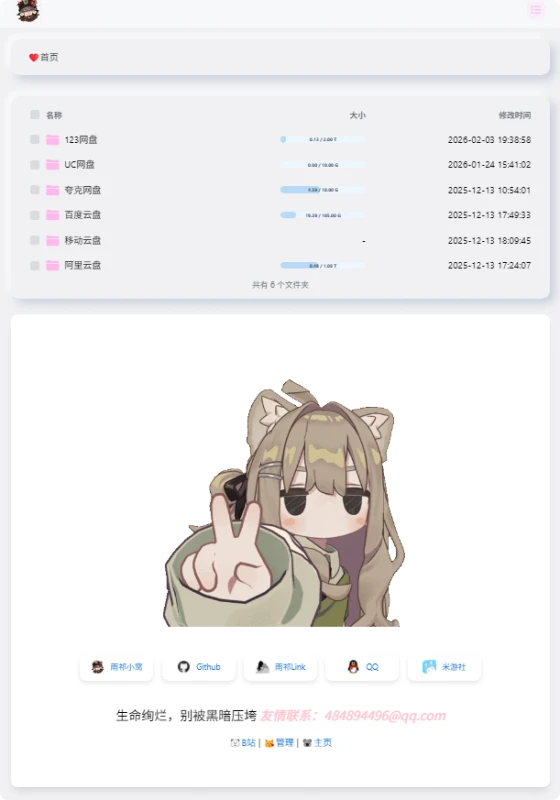
效果如下
使用方法
自定义头部
- 在后台设置-全局,找到自定义头部,写了两套方案,可根据喜好选择。
- 方案一为新拟态,可以直接复制自定义头部代码、自定义内容代码、元数据代码直接粘贴到openlist后台相应位置使用。
- 方案二为图片背景,观感上建议只用自定义头部和自定义内容代码,使用位置相同。
点击查看
方案一 新拟态
<style type="text/css">body { /* 新拟态核心色调 */ --neumorph-bg: #f0f0f3; --shadow-dark: rgba(163, 177, 198, 0.5); --shadow-light: rgba(255, 255, 255, 0.8);
/* 仅修改背景部分(不影响 flex/布局) */ background: var(--neumorph-bg) !important; background-image: none !important; /* 确保无额外背景图干扰 */
/* 纯背景新拟态(不干扰内容) */ position: relative; /* 确保背景覆盖完整 */}
/* 添加一个伪元素作为背景层(避免影响内容布局) */body::before { content: ""; position: fixed; top: 0; left: 0; width: 100%; height: 100%; z-index: -1; /* 确保在底层 */
/* 新拟态背景效果 */ background: var(--neumorph-bg); box-shadow: inset 6px 6px 12px var(--shadow-dark), inset -6px -6px 12px var(--shadow-light);}
/* 以下所有代码保持原样,不修改宽度、高度或布局 */.markdown-body,.main-content { width: 100%; max-width: 800px; padding: 30px; margin: 0 auto; text-align: center;}
.hope-c-PJLV-idaeksS-css,.hope-c-hOYTCS,.hope-c-PJLV-igScBhH-css { background: var(--neumorph-bg) !important; border-radius: 15px !important; box-shadow: 8px 8px 15px var(--shadow-dark), -8px -8px 15px var(--shadow-light) !important; border: none !important; transition: all 0.3s ease; padding: 15px 25px !important; margin: 10px auto !important; display: inline-block !important; cursor: pointer;}
.markdown-body pre,.hope-c-ctSAUo { background: var(--neumorph-bg) !important; box-shadow: inset 3px 3px 5px var(--shadow-dark), inset -3px -3px 5px var(--shadow-light) !important; border-radius: 10px !important; padding: 15px !important; margin: 0 auto 20px !important; max-width: 90%;}
.footer { text-align: center !important; margin-top: 30px; opacity: 1 !important;}
.copyright { display: flex; flex-direction: column; align-items: center; justify-content: center;}
@media screen and (max-width: 960px) { body { padding: 10px; }
.markdown-body, .main-content { padding: 15px; max-width: 95%; }}</style>方案二 图片背景
<style type="text/css">/* 新拟态核心色调保留 */:root { --neumorph-bg: #f0f0f3; --shadow-dark: rgba(163, 177, 198, 0.5); --shadow-light: rgba(255, 255, 255, 0.8);}
/* 背景图片设置 */body { background: url('https://i.postimg.cc/TPqcm4zm/hu-tao55.jpg') no-repeat center center fixed !important; background-size: cover !important; position: relative;}
/* 半透明遮罩层确保内容可读性 */body::before { content: ""; position: fixed; top: 0; left: 0; width: 100%; height: 100%; z-index: -1; background: rgba(0, 0, 0, 0.3); /* 可根据图片调整透明度 */}
/* 内容区域样式 */.markdown-body,.main-content { width: 100%; max-width: 800px; padding: 30px; margin: 20px auto; text-align: center; background: rgba(255, 255, 255, 0.85) !important; border-radius: 15px; box-shadow: 0 10px 30px rgba(0, 0, 0, 0.2);}
/* 保留原有新拟态元素样式 */.hope-c-PJLV-idaeksS-css,.hope-c-hOYTCS,.hope-c-PJLV-igScBhH-css { background: rgba(240, 240, 243, 0.9) !important; border-radius: 15px !important; box-shadow: 8px 8px 15px var(--shadow-dark), -8px -8px 15px var(--shadow-light) !important; border: none !important; transition: all 0.3s ease; padding: 15px 25px !important; margin: 10px auto !important; display: inline-block !important; cursor: pointer;}
.markdown-body pre,.hope-c-ctSAUo { background: rgba(240, 240, 243, 0.9) !important; box-shadow: inset 3px 3px 5px var(--shadow-dark), inset -3px -3px 5px var(--shadow-light) !important; border-radius: 10px !important; padding: 15px !important; margin: 0 auto 20px !important; max-width: 90%;}
/* 响应式设计 */@media screen and (max-width: 960px) { body { padding: 10px; }
.markdown-body, .main-content { padding: 15px; max-width: 95%; }}</style>自定义内容
- 在后台设置-全局-自定义内容,找到自定义内容复制粘贴即可。
- 貌似有两份一样的文件,注释了一份,但是两套都粘贴进去也可以用且底部文字会隐藏,虽然不懂,但是大受震撼😢。
点击查看
<div id="customize" style="">
</div> </center> <br> </center></div><!--延迟加载范围到这里结束--></div>
<!--延迟加载配套使用JS--><script> let interval = setInterval(() => { if (document.querySelector(".footer")) { document.querySelector("#customize").style.display = ""; clearInterval(interval); } }, 100);</script>
<!--点击烟花--><!--<script async src="https://cdn.jsdelivr.net/gh/mocchen/cssmeihua/js/yanhuabowen.js"></script>-->
<span class="js-cursor-container"></span><script async src="https://cdn.jsdelivr.net/gh/mocchen/cssmeihua/js/xiaoxingxing.js"></script><!--樱花飘落二选一--><script src="https://files.cnblogs.com/files/quaint/sakuraPlus.js"></script><!--<script async src="https://cdn.jsdelivr.net/gh/iVampireSP/special-JavaScript/yinghua.js"></script>-->
<!--音乐歌词美化--><script src="https://npm.elemecdn.com/granim@2.0.0/dist/granim.min.js"></script><script>var granimInstance = new Granim({ element: '#canvas-basic', direction: 'left-right', isPausedWhenNotInView: true, states : { "default-state": { gradients: [ ['#a18cd1', '#fbc2eb'], ['#fff1eb', '#ace0f9'], ['#d4fc79', '#96e6a1'], ['#a1c4fd', '#c2e9fb'], ['#a8edea', '#fed6e3'], ['#9890e3', '#b1f4cf'], ['#a1c4fd', '#c2e9fb'], ['#fff1eb', '#ace0f9']
] } }});</script>
<!-- 音乐增强 --><script> window.initMuscPlus = false; window.$q = window.$q || function(val) { return document.querySelector(val) } window.$qa = window.$qa || function(val) { return Array.from(document.querySelectorAll(val)) }
// 生成随机渐变色 function generateRandomGradient() { const randomColor = () => `rgba(${Math.floor(Math.random() * 255)}, ${Math.floor(Math.random() * 255)}, ${Math.floor(Math.random() * 255)}, ${Math.random().toFixed(2)})`; const color1 = randomColor(); const color2 = randomColor(); darkUIChange(); return `linear-gradient(to right, ${color1}, ${color2})`; }
;(function(){ let style = document.createElement('style') style.innerHTML = ` .music-plus .aplayer .aplayer-lrc { position: fixed; top: 180px; left: 0; right: 0; width: 88%; height: 100px; max-width: 1000px; margin: 0 auto; padding: 50px 0; transform: scale(1.3); z-index: 999; background: ${generateRandomGradient()}; /* 随机渐变背景 */ backdrop-filter: blur(10px); /* 添加高斯模糊效果 */ box-shadow: 0 4px 8px rgba(0,0,0,0.5); /* 添加阴影,增加立体感 */ transition: background 0.5s ease; /* 平滑过渡渐变背景 */ } .music-plus .aplayer .aplayer-lrc-current { font-weight: bold; transform: scale(0.95) !important; } .music-plus .aplayer .aplayer-lrc p { color: #fff; /* 设置歌词文字颜色为白色 */ opacity: 1; /* 设置透明度 */ transform: scale(0.9); } .music-control { position: absolute; right: 4px; top: 4px; display: flex; align-items: center; } .music-control i { cursor: pointer; width: 22px; height: 22px; display: flex; align-items: center; justify-content: center; font-size: 14px; border-radius: 50%; background: rgba(255, 255, 255, 0.2); /* 控制按钮背景颜色 */ margin-left: 4px; font-style: normal; } /*电脑模式音乐歌词容器设置*/ @media screen and (min-width: 1200px) { .music-plus .aplayer .aplayer-lrc { left: 0; right: 0; width: 410px; height: 100px; padding: 100px 0; top: 212px; }
} ` document.body.appendChild(style)
})();
setTimeout(() => { let stack = document.querySelector('#musicPlus2') let span = document.createElement('span') span.innerHTML = '|' stack.appendChild(span) let a = document.createElement('a') a.style = `padding: var(--hope-space-1_5); cursor: pointer; ` a.innerHTML = '音乐加强' a.onclick = changeMusic stack.appendChild(a)
document.addEventListener('keydown', function(e) { if (e.ctrlKey) { const type = ['4', '['].includes(e.key) ? 1 : ['6', ']'].includes(e.key) ? 3 : ['5', '\\'].includes(e.key) ? 2 : null if (type) { e.preventDefault() e.stopPropagation() musicMove(type) } } }) }, 1000)
function darkUIChange() { // 获取当前页面宽度,设置样式 var documentWidth = $(document).width(); let widthIsMin = 0; if (documentWidth<600){ widthIsMin = 1; } // 黑夜模式调整样式 let isDarkUI= document.querySelector('.hope-ui-dark') if (isDarkUI){ $(".music-plus .aplayer .aplayer-lrc").css("top", "315px"); // 小屏幕 手机 调整样式 if(widthIsMin){ $(".music-plus .aplayer .aplayer-lrc").css("top", "332px"); } }
}
function changeMusic() { let lrcWarp = document.querySelector('.aplayer .aplayer-lrc') if (!lrcWarp) return alert('没有找到歌词容器')
if (!window.initMuscPlus || !$q('.music-control')) { let control = document.createElement('div') control.className = 'music-control' control.innerHTML = `<i onclick="musicMove(1)" title="CTRL+[ 上一曲">◄</i> <i onclick="musicMove(2)" title="CTRL+] 上一曲">◼</i> <i onclick="musicMove(3)" title="CTRL+\\ 暂停">►</i>` document.querySelector('.aplayer-body').append(control) } window.initMuscPlus = true let cls = document.body.className if (cls.includes('music-plus')) { document.body.className = document.body.className.replace(' music-plus', '') } else { document.body.className += ' music-plus' }
// 每次切换歌曲时重新生成渐变背景 lrcWarp.style.background = generateRandomGradient(); darkUIChange();
}
function musicMove(type) { if (type == 2) { return $q('.aplayer-pic').click() } let list = $qa(`.aplayer-list li`) let ind = list.findIndex(item => item.classList.contains('aplayer-list-light')) let index = type == 1 ? ind - 1 : type == 3 ? ind + 1 : ind index = index < 0 ? list.length - 1 : index > list.length - 1 ? 0 : index list[index].click()
}
</script><!---去掉底部文字--->
<!--延迟加载范围到这里结束--></div>
<!--延迟加载配套使用JS--><script> let interval = setInterval(() => { if (document.querySelector(".footer")) { document.querySelector("#customize").style.display = ""; clearInterval(interval); } }, 100);</script>
<!--点击烟花--><!--<script async src="https://cdn.jsdelivr.net/gh/mocchen/cssmeihua/js/yanhuabowen.js"></script>-->
<span class="js-cursor-container"></span><script async src="https://cdn.jsdelivr.net/gh/mocchen/cssmeihua/js/xiaoxingxing.js"></script><!--樱花飘落二选一--><script src="https://files.cnblogs.com/files/quaint/sakuraPlus.js"></script><!--<script async src="https://cdn.jsdelivr.net/gh/iVampireSP/special-JavaScript/yinghua.js"></script>-->
<!--音乐歌词美化--><script src="https://npm.elemecdn.com/granim@2.0.0/dist/granim.min.js"></script><script>var granimInstance = new Granim({ element: '#canvas-basic', direction: 'left-right', isPausedWhenNotInView: true, states : { "default-state": { gradients: [ ['#a18cd1', '#fbc2eb'], ['#fff1eb', '#ace0f9'], ['#d4fc79', '#96e6a1'], ['#a1c4fd', '#c2e9fb'], ['#a8edea', '#fed6e3'], ['#9890e3', '#b1f4cf'], ['#a1c4fd', '#c2e9fb'], ['#fff1eb', '#ace0f9']
] } }});</script>
<!-- 音乐增强 --><script> window.initMuscPlus = false; window.$q = window.$q || function(val) { return document.querySelector(val) } window.$qa = window.$qa || function(val) { return Array.from(document.querySelectorAll(val)) }
// 生成随机渐变色 function generateRandomGradient() { const randomColor = () => `rgba(${Math.floor(Math.random() * 255)}, ${Math.floor(Math.random() * 255)}, ${Math.floor(Math.random() * 255)}, ${Math.random().toFixed(2)})`; const color1 = randomColor(); const color2 = randomColor(); darkUIChange(); return `linear-gradient(to right, ${color1}, ${color2})`; }
;(function(){ let style = document.createElement('style') style.innerHTML = ` .music-plus .aplayer .aplayer-lrc { position: fixed; top: 180px; left: 0; right: 0; width: 88%; height: 100px; max-width: 1000px; margin: 0 auto; padding: 50px 0; transform: scale(1.3); z-index: 999; background: ${generateRandomGradient()}; /* 随机渐变背景 */ backdrop-filter: blur(10px); /* 添加高斯模糊效果 */ box-shadow: 0 4px 8px rgba(0,0,0,0.5); /* 添加阴影,增加立体感 */ transition: background 0.5s ease; /* 平滑过渡渐变背景 */ } .music-plus .aplayer .aplayer-lrc-current { font-weight: bold; transform: scale(0.95) !important; } .music-plus .aplayer .aplayer-lrc p { color: #fff; /* 设置歌词文字颜色为白色 */ opacity: 1; /* 设置透明度 */ transform: scale(0.9); } .music-control { position: absolute; right: 4px; top: 4px; display: flex; align-items: center; } .music-control i { cursor: pointer; width: 22px; height: 22px; display: flex; align-items: center; justify-content: center; font-size: 14px; border-radius: 50%; background: rgba(255, 255, 255, 0.2); /* 控制按钮背景颜色 */ margin-left: 4px; font-style: normal; } /*电脑模式音乐歌词容器设置*/ @media screen and (min-width: 1200px) { .music-plus .aplayer .aplayer-lrc { left: 0; right: 0; width: 410px; height: 100px; padding: 100px 0; top: 212px; }
} ` document.body.appendChild(style)
})();
setTimeout(() => { let stack = document.querySelector('#musicPlus2') let span = document.createElement('span') span.innerHTML = '|' stack.appendChild(span) let a = document.createElement('a') a.style = `padding: var(--hope-space-1_5); cursor: pointer; ` a.innerHTML = '音乐加强' a.onclick = changeMusic stack.appendChild(a)
document.addEventListener('keydown', function(e) { if (e.ctrlKey) { const type = ['4', '['].includes(e.key) ? 1 : ['6', ']'].includes(e.key) ? 3 : ['5', '\\'].includes(e.key) ? 2 : null if (type) { e.preventDefault() e.stopPropagation() musicMove(type) } } }) }, 1000)
function darkUIChange() { // 获取当前页面宽度,设置样式 var documentWidth = $(document).width(); let widthIsMin = 0; if (documentWidth<600){ widthIsMin = 1; } // 黑夜模式调整样式 let isDarkUI= document.querySelector('.hope-ui-dark') if (isDarkUI){ $(".music-plus .aplayer .aplayer-lrc").css("top", "315px"); // 小屏幕 手机 调整样式 if(widthIsMin){ $(".music-plus .aplayer .aplayer-lrc").css("top", "332px"); } }
}
function changeMusic() { let lrcWarp = document.querySelector('.aplayer .aplayer-lrc') if (!lrcWarp) return alert('没有找到歌词容器')
if (!window.initMuscPlus || !$q('.music-control')) { let control = document.createElement('div') control.className = 'music-control' control.innerHTML = `<i onclick="musicMove(1)" title="CTRL+[ 上一曲">◄</i> <i onclick="musicMove(2)" title="CTRL+] 上一曲">◼</i> <i onclick="musicMove(3)" title="CTRL+\\ 暂停">►</i>` document.querySelector('.aplayer-body').append(control) } window.initMuscPlus = true let cls = document.body.className if (cls.includes('music-plus')) { document.body.className = document.body.className.replace(' music-plus', '') } else { document.body.className += ' music-plus' }
// 每次切换歌曲时重新生成渐变背景 lrcWarp.style.background = generateRandomGradient(); darkUIChange();
}
function musicMove(type) { if (type == 2) { return $q('.aplayer-pic').click() } let list = $qa(`.aplayer-list li`) let ind = list.findIndex(item => item.classList.contains('aplayer-list-light')) let index = type == 1 ? ind - 1 : type == 3 ? ind + 1 : ind index = index < 0 ? list.length - 1 : index > list.length - 1 ? 0 : index list[index].click()
}
</script><!---去掉底部文字---><style type="text/css"> .footer { display: none !important; } </style>元数据
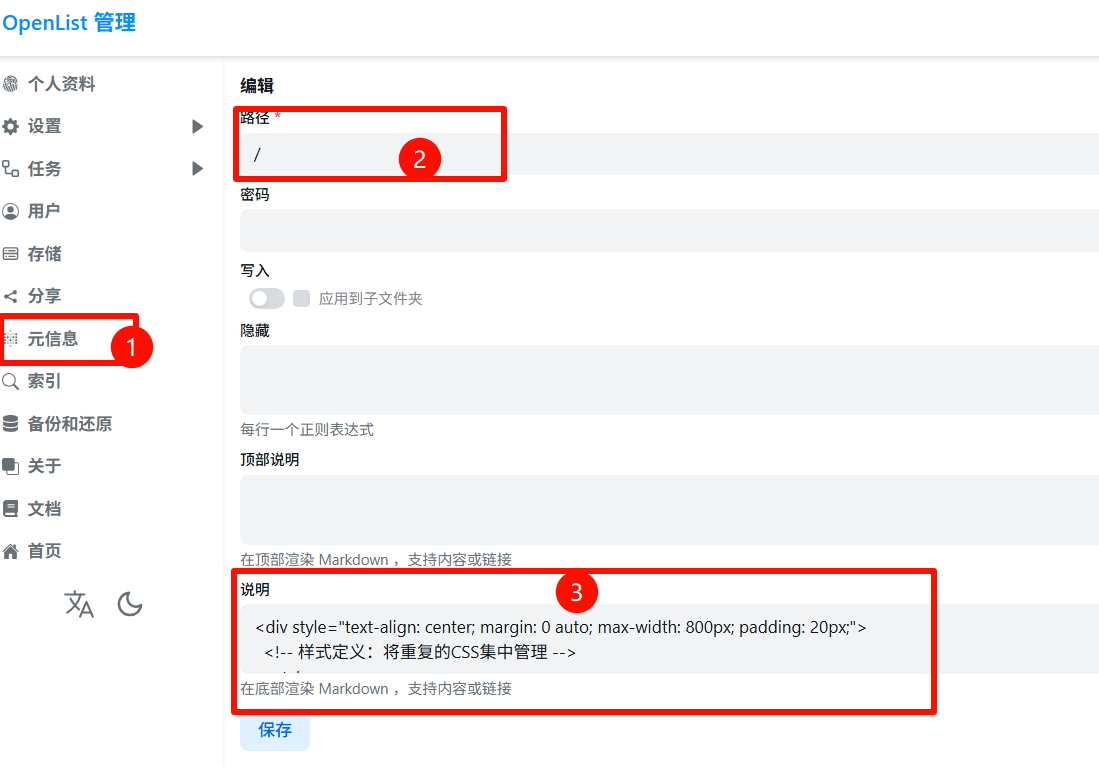
- 在后台设置-元信息-添加-按图输入,最后代码复制粘贴即可。
点击查看
<style> /* 通用链接样式 */ a { color: #333; text-decoration: none; transition: transform 0.3s ease, color 0.3s ease; }
a:hover { transform: scale(1.05) translateY(-2px); /* 微调悬停效果,Grid布局下放大1.1可能会遮挡邻居 */ color: #fecfe8; }
/* --- 社交链接区域:Grid布局核心代码 --- */ .social-grid { display: grid; /* 大屏幕默认:5列,等宽 */ grid-template-columns: repeat(5, 1fr); gap: 15px; /* 间距 */ margin: 40px 0; }
/* 社交链接卡片样式 */ .social-link { display: flex; align-items: center; justify-content: center; text-decoration: none; color: #333; background: rgba(255,255,255,0.7); border-radius: 12px; padding: 12px; box-shadow: 0 4px 8px rgba(0,0,0,0.1); /* Grid布局下,宽度由网格控制,无需设置flex/min-width */ transition: transform 0.3s ease, box-shadow 0.3s ease; }
.social-link img { width: 24px; height: 24px; margin-right: 10px; flex-shrink: 0; } .social-link span { font-size: 14px; white-space: nowrap; /* 防止文字换行 */ }
/* --- 响应式布局:小屏幕 --- */ @media screen and (max-width: 768px) { .social-grid { /* 变为 2 列布局 */ grid-template-columns: repeat(2, 1fr); /* 调整间距 */ gap: 12px; }
/* 关键代码:让第5个元素独占一行 */ /* nth-child(5) 选中第5个链接 */ .social-link:nth-child(5) { grid-column: 1 / -1; /* 从第一列跨越到最后一列 */
/* 可选:如果希望第5个按钮居中显示不全宽,取消下面注释 */ /* max-width: 200px; */ /* justify-self: center; */ } }
/* 极小屏幕微调 */ @media screen and (max-width: 400px) { .social-link { padding: 10px; } .social-link span { font-size: 12px; } }
.footer-text { font-family: 'Ma Shan Zheng', 'Noto Sans SC', sans-serif; font-size: 1.4rem; color: #5c5c5c; margin: 30px 0; line-height: 1.8; }</style>
<!-- 主体内容区域 --><div style="text-align: center; margin: 0 auto; max-width: 800px; padding: 20px;">
<!-- 图片 --> <img src="https://i.postimg.cc/6QdKc2Fv/mao-mao.gif" alt="猫猫" style="max-width: 80%; border-radius: 8px; box-shadow: 0 4px 12px rgba(0,0,0,0.1);">
<!-- 社交链接区域:改为 grid 类名 --> <div class="social-grid"> <a href="https://www.miyoushe.com/sr/accountCenter/postList?id=227165994" class="social-link"><img src="https://img-static.mihoyo.com/favicon.ico" alt="米游社"><span>米游社</span></a> <a href="https://github.com/qitinyu" class="social-link"><img src="https://github.com/fluidicon.png" alt="Github"><span>Github</span></a> <a href="https://link3.cc/qtya" class="social-link"><img src="https://tencentcdna.production.link3.cc/profile_images/1771645386577" alt="Bilibili"><span>雨祁Link</span></a> <a href="https://qm.qq.com/cgi-bin/qm/qr?k=-A9MUAbpO68zcu1YAp11NiI3ir7WczLO" class="social-link"><img src="https://qzonestyle.gtimg.cn/qzone/qzact/act/external/tiqq/logo.png" alt="QQ"><span>QQ</span></a> <a href="https://yqamm.eu.cc" class="social-link"><img src="https://i.postimg.cc/P58nMvsQ/wang-biao.png" alt="雨祁小窝"><span>雨祁小窝</span></a> </div>
<!-- 文艺文字 --> <p class="footer-text" style="color:#000"> 生命绚烂,别被黑暗压垮 <span style="color: pink;margin-left: 20px;"><i>  友情联系:<a href="mailto:484894496@qq.com" style="color:pink">484894496@qq.com</a></i></span> </p>
<!-- 底部导航 --> <div style="font-size: 15px; font-weight: bold; margin-top: 20px;"> <a href="https://space.bilibili.com/3461582895974946" target="_blank">🐻❄️B站</a> | <a href="/@manage">😽管理</a> | <a href="/" target="_blank">🐨主页</a> </div>
</div>
<!-- 底部提醒区 --> **⚠️<span style="color:#C2C3C4">希望这些文件可以帮助到你(●'◡'●)</span>**</br> **⚠️<sapn style="color:#C2C3C4">资源均无偿分享,可能会随时失效/<del>和谐</del>,请及时下载保存(●'◡'●)</span>**🌈友情文章
分享
如果这篇文章对你有帮助,欢迎分享给更多人!
部分信息可能已经过时
相关文章 智能推荐